

Automatically map your Attack Surface with results from multiple tools
Get a global view of potential infiltration points an attacker can use, including open ports, running services and software, outdated web technologies, and screenshots.
Automatically created from your tool scan results, the Attack Surface gives you jumping-off points for the next steps in your pentesting engagement.
How automatic Attack Surface mapping works
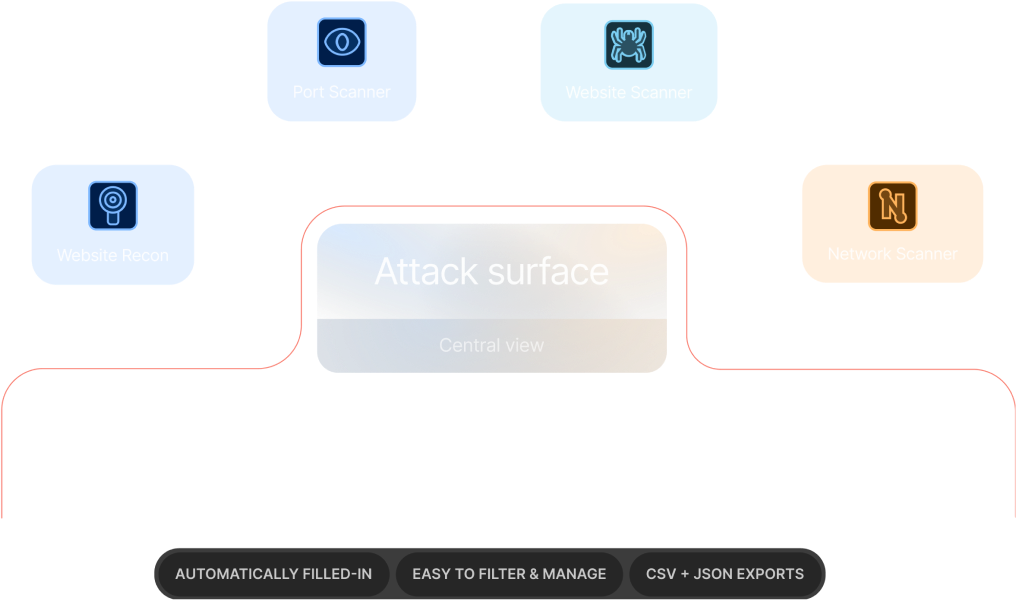
The Attack Surface view aggregates data from these tools:


Launch scans with any of these tools and watch as your Attack Surface auto-fills with crucial details like IP addresses, hostnames, operating systems, open ports, services, technology versions, and screenshots.
And with targets neatly organized in workspaces, you get a comprehensive exposure map for each engagement with zero time spent on manual data compilation.
Key security risks you can diagnose using the Attack Surface

Outdated, exploitable server software

Open ports (that shouldn’t be publicly accessible)

Internal network services exposed on the public network

Old and forgotten web technologies
6 ways to use the Attack Surface on Pentest-Tools.com
1. Find initial access points attackers can use
Identify infrastructure entry points an attacker might leverage to compromise the target using data about its technology stacks, service versions, and open ports.
2. Prioritize remediation for critical exposures
Identify which parts of the system are most vulnerable (e.g. servers, websites, databases, etc.) and reduce risk through targeted actions (e.g. closing ports, retiring unused services, etc.).
3. Assess how much work a pentest might involve
Scope out your future pentesting engagements and reduce your guesswork. Alternatively, compile more accurate budget proposals for internal projects.
4. Understand how the Attack Surface changes over time
Regular scans with our toolkit keep your Attack Surface up to date and accurate, giving you time to address exposures before attackers notice - and use them.
5. Create, improve, and track effectiveness of security policies
Use insights from the Attack Surface to develop and refine internal security policies, keeping them aligned with the actual risks the organization faces.
6. Manage risk from third-party integrations and services
Understand how third-party integrations and services contribute to the organization’s exposure and find ways to manage and mitigate risks associated with them.
How we make it easier to manage your Attack Surface

See and export all Attack Surface data in a structured format

Zero in on specific exposed and vulnerable components

Let everyone contribute to and use the Attack Surface

Keep the Attack Surface updated with recurring scans
How customers use the Attack Surface
Pentest-Tools.com allows for rapid deployment and automation of many industry-standard security tools; then organizes the results into an easy-to-view attack surface. This allows our penetration testers more time to focus on vulnerability analysis and exploitation.
An added benefit that has been fantastic is that the ease of use allows new employees to add value to an engagement on their first day.
Travis D.
Security Engineering Manager




Developed for..
Pentesters who lack the time to develop their own discovery modules
Network security specialists in charge of security risk assessments
DevOps teams tasked with preventing security gaps in web apps
Developers who understand and manage application security risks
Pentesters looking to preview the scope and work for their future engagements
Business owners with a knack for security as a core performance metric
Attack surface FAQs
Currently, the following tools generate data for the Attack Surface: Website Recon, the Website Vulnerability Scanner, the TCP Port Scanner, the UDP Port Scanner, the Network Vulnerability Scanner.
We plan to add data for other tools and scanners at Pentest-Tools.com in future iterations. Keep an eye on our changelog, blog, and on our LinkedIn page to be the first to know when we do! You can also explore more details in the dedicated article in our Support Center.